#1
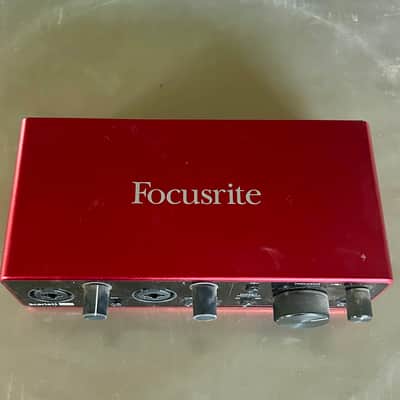
Focusrite Scarlett 2i2 (3rd/4th Gen)
2-in / 2-out$60–$110 usedBest for: Beginners, singer-songwriters, home studio starting point
The Scarlett 2i2 is the best-selling audio interface in the world. Two combo inputs (XLR/TRS), 48V phantom power, USB bus-powered, and class-compliant on Mac and Windows without drivers. The 3rd and 4th generation models have 56dB of gain, which is enough for dynamic mics like the SM7B (though an in-line preamp helps). Used 3rd gen examples at $60–$80 are essentially flawless for home recording entry-level use.
What to check used: Check the phantom power switch (48V) works on both channels. Test both mic and instrument inputs. Verify the USB-C cable compatibility — 4th gen is USB-C, 3rd gen is USB-C or Micro-B depending on vintage.
#2
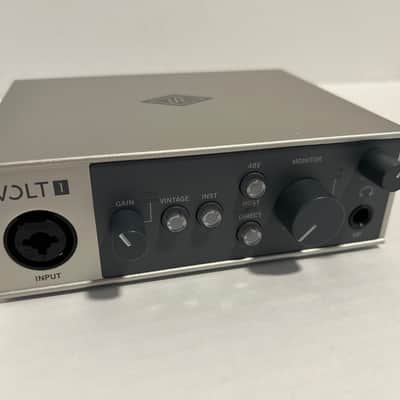
Universal Audio Apollo Twin X
2-in / 6-out$600–$900 usedBest for: Professional home studio, real-time UAD plugin processing
The Apollo Twin X is the gold standard for home studio audio interfaces. Its Unison preamps model vintage hardware (Neve 1073, API Vision, SSL) at the hardware level — not just as a software effect. The UAD DSP chip processes plugins in real-time with near-zero latency. Once you track with a Neve 1073 emulation on the way in, the difference is permanent. Used Twins save $300–$500 off new prices.
What to check used: Verify the included UAD plugin licenses are transferable — they are, but the seller should have completed ownership transfer on the UA account before sale. Check that all UAD plugs load correctly in your DAW.
#3
Motu M2
2-in / 2-out$120–$170 usedBest for: Mid-range home studio, excellent preamp quality for the price
Widely considered the best-measuring audio interface under $200 — the preamps have lower noise floor and better dynamic range than the Scarlett 2i2 at a similar price point. Also has a distinctive front-panel display showing levels. For musicians who care about technical spec quality at a mid-range budget, the M2 outperforms more expensive competition on paper.
What to check used: The Motu M2 uses a USB-C connection — verify the cable and port are functional. The hardware metering display occasionally has display glitches (cosmetic, not functional).
#4
SSL 2+
2-in / 4-out$150–$220 usedBest for: Home studio with SSL heritage, versatile output routing
SSL (Solid State Logic) makes the mixing consoles used on almost every major album recorded since 1977. The SSL 2+ brings SSL's mic preamp heritage to a $200 interface. The Legacy 4K button adds subtle harmonic saturation inspired by the SSL 4000 console. Four balanced outputs make it ideal for monitoring setups with multiple speaker pairs.
What to check used: The 4K button adds saturation — test it with and without to understand what it does before assuming something is broken. Check both XLR inputs with a mic and verify phantom power.
#5
Audient iD4 MkII
1-in / 2-out$120–$170 usedBest for: Vocalist or guitarist recording solo, high-quality preamp on a budget
The Audient iD4 uses the same discrete Class A mic preamp design as Audient's professional console line — the same company that makes $30,000 studio mixing consoles. One mic input and one instrument input, so it's a solo musician's interface, not a band recording tool. But that one preamp is exceptional — lower noise and better headroom than comparably priced competition.
What to check used: Only one XLR input — verify this works for your use case before buying. Test the JFET instrument input as well. The iD4's scroll wheel replaces traditional knobs — verify it moves smoothly and registers correctly.
#6
PreSonus AudioBox USB 96
2-in / 2-out$50–$80 usedBest for: Budget home recording, students, entry-level podcasters
The budget entry point — lower noise floor than older PreSonus models, 24-bit/96kHz operation, two combo inputs, and simple driver-based operation. Used examples are abundant at $50–$80. Often bundled with Studio One Artist (DAW) — check if the license is included with the sale.
What to check used: Test both channels and verify the headphone monitoring works. Some older AudioBox models had USB bus-power issues — if it randomly disconnects, the USB cable or port may be marginal.
#7
RME Babyface Pro FS
4-in / 4-out$400–$600 usedBest for: Professional recording, lowest latency available, touring use
RME is the professional benchmark for audio interface stability and low latency. The Babyface Pro FS is compact enough to tour with but professional enough for high-stakes tracking sessions. RME's driver architecture achieves 1–2ms round-trip latency even on Windows — the lowest latency of any interface at any price. Professional recording engineers and touring musicians trust RME exclusively.
What to check used: RME interfaces require TotalMix FX software for routing — it has a learning curve. Verify firmware is updated and TotalMix is installed correctly. Check that bus-powered mode works reliably.
#8
TASCAM US-2x2HR
2-in / 2-out$80–$120 usedBest for: Budget-mid home studio, podcasting, instrument recording
Hits the spot between AudioBox budget and Scarlett quality. Ultra-HDDA mic preamps with low self-noise, 24-bit/192kHz operation, two combo inputs, and MIDI I/O built in — uncommon at this price. Higher preamp gain than many competitors — useful for quiet ribbon microphones. Solid build quality from a brand with 50 years of audio equipment experience.
What to check used: Check the MIDI I/O works if that feature matters to you. Verify both combo inputs and phantom power. The TASCAM driver on Windows requires installation — check compatibility with your Windows version.